
In this guide, we explain how we keep documents safe in coworking space while protecting what matters most to directors and country managers: client trust, compliance posture, and business continuity.
You will see how locker rental for proper storage and an in-house shredder for proper disposal fit into a practical model that supports return on investment, agility, scalability, and long-term stability, without turning your team into full-time administrators.
What’s Really At Risk For SMEs Working In Shared Offices
Our Raffles Quay coworking space, like coworking near Tanjong Pagar MRT, can be an intelligent allocation of capital, but the risk profile is different from a conventional lease. It is usually quiet, plausible, and avoidable.
When leadership teams consider a coworking space near Cecil Street MRT or elsewhere in the central business district, the question is whether your documents behave like assets or liabilities once they enter a shared environment.
Confidentiality, Client Trust, And Compliance Exposure
In professional services, confidentiality is a commercial guarantee that clients assume you can honour.
Document risk typically clusters around:
- Personally identifiable information in curriculum vitae, identity documents, payroll, and medical-related attachments.
- Client matter files including engagement letters, statements of work, dispute correspondence, and due diligence packs.
- Financial data such as management accounts, investor updates, pricing sheets, and banking details.
A printed contract left on a tray can be photographed. A meeting room whiteboard can be read through a glass panel. A courier envelope can be collected by the wrong person.
Business Continuity Risk: One Slip Can Disrupt Deals And Delivery
A document incident can freeze decision-making. Leadership pauses approvals. Teams re-check what else may have been exposed. Clients ask for reassurances and remediation steps.
In practice, it affects:
- Deal velocity: procurement or legal teams extend review cycles when confidence is shaken.
- Delivery: project teams lose time reconstructing the "latest version" after access is restricted.
- Staff focus: the emotional temperature shifts. People become cautious, slow, and reactive.
Where Document Leaks Typically Happen (Often By Accident)
Most leaks occur at transition points: where a document changes hands, location, or format.
Common, unglamorous failure moments include:
- Printer output trays: a single queue can become a de facto distribution channel.
- Desks at shift changes: end-of-day fatigue and the "I will clear it tomorrow" habit.
- Meeting rooms: papers under notepads, flipchart sheets left behind, screens still mirrored.
- Improvised storage: shared drawers, open shelves, or unlocked cabinets during busy weeks.
- Mail areas: unattended envelopes, mis-sorted packages, or courier signatures done in haste.
This is why our approach focuses on defaults and operating standards.
A Practical Security Model: People, Space, Process, And Technology
Security in a coworking environment works when it is treated like risk governance: clear ownership, sensible controls, and consistent execution. If controls are elegant, teams follow them. If controls are heavy, they are bypassed.
We use a four-part model because document safety is not a single product. It is a system.
What We Control As Your Operator vs What Your Team Owns
In practice, a stable security posture depends on separating what we can guarantee from what must be embedded in your internal discipline.
What we control as operator (environmental controls):
- Access management to floors and defined areas where appropriate.
- Surveillance coverage in common circulation zones, supporting deterrence and investigation.
- Document infrastructure such as secure storage options and on-site disposal tools.
- Network standards that reduce exposure on shared connectivity.
What your team owns (behavioural controls):
- Clean desk adherence, including end-of-day resets.
- Print discipline, including collection timing and handling etiquette.
- Device hygiene: screen locks, account access, and recipient verification.
- Escalation: reporting near-misses early rather than after damage.
This shared model avoids the familiar problem where everyone assumes someone else is responsible.
Security That Supports ROI, Agility, Scalability, And Stability
Done properly, document controls:
- Protect return on investment by preventing high-cost remediation, client concessions, and operational slowdowns.
- Enable agility because you can scale headcount and projects without rebuilding controls from scratch.
- Support scalability through repeatable processes that hold even when the team doubles.
- Strengthen stability by reducing operational surprises that leadership cannot plan around.
Right-Sizing Controls Without Creating Admin Fatigue
We encourage right-sizing by asking three questions:
- What is the highest-sensitivity document you handle weekly?
- Where does it physically sit during a normal day?
- How does it leave the office, including disposal?
Then we map controls to those answers.
For example, a recruitment firm with high volumes of curriculum vitae needs disciplined printing and shredding, plus predictable storage.
A consultancy managing board packs may require our private serviced offices instead of a coworking space, sound discipline, and clear chain-of-custody habits.
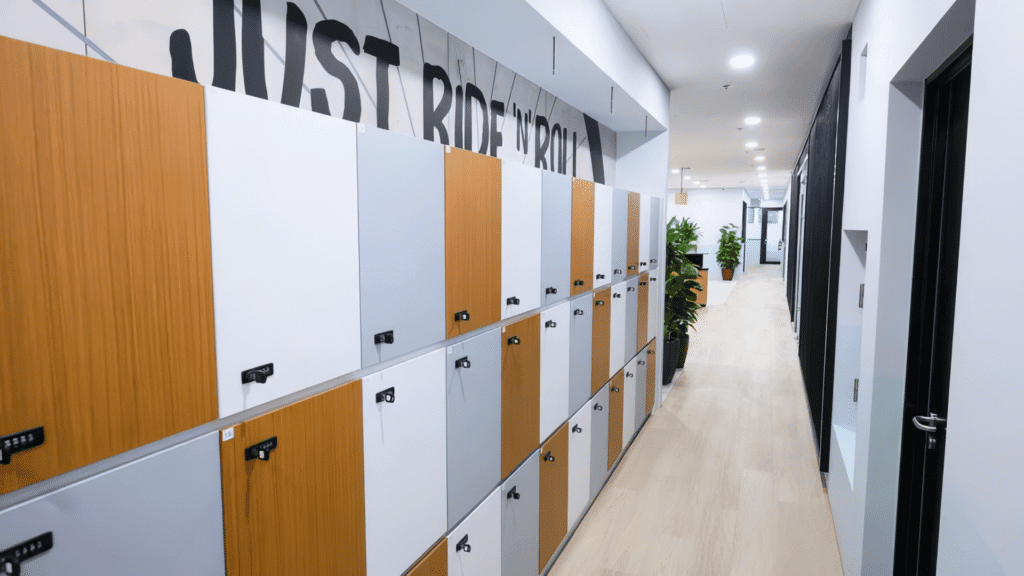
Secure Storage By Default: Locker Rental For Proper Storage
In shared environments, the most effective control is often the least glamorous: reliable storage.
When You Should Use A Locker (And What Should Never Be Left Out)
We recommend locker use when documents are either sensitive by nature or costly if misplaced.
Use a locker for:
- Signed contracts and engagement letters
- Client identification documents and onboarding packs
- Curriculum vitae and candidate shortlists
- Financial reports, invoices awaiting approval, banking forms
- Tender documents, pricing sheets, and negotiation notes
Never leave out overnight:
- Anything with personal data
- Anything with signatures or account details
- Any document that would embarrass you if photographed
If the answer to "could this damage client trust" is yes, it belongs in secure storage.
How Locker Rental Works In Practice For 5–20 Person Teams
For teams in the five to twenty person range, storage is a workflow problem as much as a security problem.
A practical approach looks like this:
- One shared team locker for day-to-day sensitive files (client packs, current projects).
- One restricted locker for leadership or finance (banking, payroll, board materials).
- Named ownership: each locker has an accountable custodian, even if access is shared.
Chain-Of-Custody Habits: Check-In/Check-Out For Sensitive Files
A chain-of-custody habit turns "I think it is on someone's desk" into a known state.
For small teams, a lightweight model is enough:
- A simple log (paper or digital) for high-sensitivity files only.
- Check-out requires a name, time, and purpose.
- Check-in requires confirmation that the document returned to storage.
This is particularly useful for recruitment and legal-adjacent work where document versions change quickly and the wrong copy can derail a process.
Security Tips For Clean Desk, Whiteboards, And Meeting Rooms
Storage works best when paired with predictable end-of-day behaviour.
We encourage a "two-minute reset":
- Clear desk surface: no loose pages, no sticky notes with names or numbers.
- Whiteboards wiped after meetings, including partial notes.
- Meeting room sweep: under notepads, under laptops, near power ports.
- Screens disconnected and input sources reset.
Secure Disposal On-Site: In-House Shredder For Proper Disposal
Storage prevents leakage today. Disposal prevents leakage tomorrow.
A surprising number of incidents begin with documents that were "no longer needed". They end up in general waste, recycling, or a bag waiting to be taken home. Time passes, then the document reappears in the wrong context.
Our in-house shredder for proper disposal changes the economics: you do not need to schedule a separate process. You can close the loop immediately.
What Belongs In The Shred Pile (Contracts, CVs, Financials, IDs)
If a document contains personal data, commercial terms, or identifiers, shredding should be the default.
Typical shred candidates include:
- Contracts, addendums, and pricing schedules
- Curriculum vitae, interview notes, reference checks
- Financial statements, invoices, payment instructions
- Copies of identity documents and onboarding forms
- Client correspondence that references confidential matters
If you hesitate, shred it. A slightly higher paper disposal volume is cheaper than a reputational explanation.
How On-Site Shredding Reduces Risk And Improves Operational Speed
On-site shredding removes two common failure points:
- The waiting period where documents sit "to be disposed of later".
- The hand-off where someone else is expected to deal with it.
It also improves operational speed. Teams can complete admin tasks in the same block of time as printing and filing, rather than batching disposal at the end of the week when urgency and attention are lower.
Shredding Process Standards: Timing, Bins, And Staff Access
A shredder is not enough if process is vague. We recommend clear standards:
- Defined shred timing: daily for high-volume teams: at minimum, end of day.
- Designated shred containers: avoid mixing with general waste.
- Access discipline: restrict shredding authority where needed, especially for identity documents and finance materials.
- No "review piles" on desks. If it is approved for disposal, it moves to shredding.
Disposal For Non-Paper Media (Badges, Labels, Storage Devices)
Paper is only one part of the story. Data also lives on objects.
Treat these as disposal items with care:
- Old access badges and visitor passes
- Printed labels with names, suite numbers, tracking details
- Storage devices such as portable drives
- Damaged laptops or mobile devices awaiting collection
For devices, shredding is not appropriate. But secure retention and controlled hand-off are. We advise teams to store items pending disposal in a restricted locker until collection or certified destruction is arranged.
Printing, Scanning, And Mail Handling Without The Usual Shared-Office Risks
Printing, scanning, and mail sit at the intersection of speed and exposure. Shared-office routines can be efficient, yet the default behaviour is often too casual for professional services.
Secure Print Practices: Hold Printing, Collection Etiquette, And Logs
Where possible, we favour print workflows that reduce unattended output.
Effective practices include:
- Hold printing so pages are released only when the authorised user is present.
- Immediate collection: print should be treated like cash at an automated teller machine
- Collection etiquette: no sorting through someone else's pages to find your own.
- Light logging for sensitive packs: who printed, when, and what type.
This is also where teams benefit from clear technology standards. Network and device settings influence how easy it is to do the right thing.
Scanning And Emailing: Minimising Mis-Sends And Wrong Recipients
We recommend:
- Recipient verification for external emails: confirm domain, confirm individual.
- File naming discipline: reduce the chance of attaching the wrong version.
- Use secure links for high-sensitivity files rather than open attachments when appropriate.
- Second-person check for critical packs: another team member verifies recipient and document set.
Digital controls matter here, and we address them in more detail in our overview of cybersecurity essentials in coworking environments.
Mail And Courier Handling: Reducing Misdelivery And Unattended Packages.
Sound handling includes:
- Controlled receipt: items are received and recorded, not left unattended.
- Clear labelling standards for suites and recipients.
- Prompt notification to intended recipients.
- No open storage of sensitive mail in common areas.
Visitor And Contractor Controls Around Document Areas
Visitors and contractors are part of modern office life: fit-out maintenance, deliveries, client meetings.
We encourage a simple standard:
- Visitors remain escorted in document-heavy areas.
- Contractors are scheduled where possible, not roaming.
- Teams avoid leaving documents in reception-facing spaces during high visitor traffic.
The aim is not suspicion. It is to reduce opportunity for accidental viewing and casual photography, which can happen faster than most teams expect.
Meeting Room Reset Checklist: Papers, Flipcharts, Screens, And Ports
A reset checklist is a quiet form of professionalism. It prevents the "last ten minutes" problem.
We recommend a short checklist after every sensitive meeting:
- Collect all papers, including drafts and notes
- Remove flipchart sheets, or photograph and store securely, then wipe
- Disconnect devices and clear wireless display histories
- Check table edges and chair backs for slipped pages
- Confirm no documents remain near power ports or under pads
Teams that adopt this habit tend to look composed in front of clients. That composure is part of the brand.
Digital Controls That Protect Documents Beyond Paper.
In a coworking context, digital controls need to be strong enough for professional services, yet light enough for a five to twenty person team to run without constant support.
Secure Network Basics In Coworking: Segmentation, Wi‑Fi Policies, And VPN Use
A shared environment must treat connectivity as a managed service, not a convenience.
Core practices include:
- Network segmentation to reduce cross-tenant exposure.
- Clear wireless policies: approved networks only, no ad hoc hotspots for sensitive work.
- Virtual private network use for remote access and sensitive systems, aligned to your internal risk appetite.
Device And Account Hygiene For Small Teams (Without Heavy IT Overhead)
A small team can achieve strong hygiene without enterprise complexity.
We recommend:
- Multi-factor authentication for key accounts where available
- Password management with a reputable tool rather than shared spreadsheets
- Standard device encryption and regular updates
- Separate admin accounts from daily user accounts
The objective is to reduce the chance that a single lost device becomes a document breach.
Preventing Screen Leaks: Auto-Lock, Privacy Filters, And Clear Display Rules
Screen leaks are the digital equivalent of leaving papers on a desk.
Simple controls:
- Auto-lock after short inactivity
- Privacy filters for desks facing corridors or shared zones
- A rule that sensitive documents are not displayed in open lounge areas
- Disable screen previews on lock screens for messaging and email where practical
These choices are not about distrust. They are about reducing the information that can be harvested casually.
How In-house IT team Helps Reduce Downtime And Risk Escalation
When technology fails, people improvise. Improvisation is where risk escalates.
In-house support helps by:
- Resolving connectivity issues quickly so teams do not route files through insecure channels
- Enforcing consistent device and network standards
- Supporting secure printing and scanning workflows
- Acting as a rapid escalation point when a potential incident is detected
For leadership, this is a stability play. Fewer disruptions, fewer risky shortcuts, less operational drag.
Scaling Safely: How Document Security Stays Strong As Your Team Grows
Growth is an operational stress test. The controls that work at six people can fail at sixteen if they depend on familiarity rather than structure.
Scaling safely means designing document handling so it survives new hires, short-term projects, and fast-moving client demands.
Onboarding And Offboarding: Access, Keys, Lockers, And Document Return
Most security posture is set at the edges: when someone joins and when someone leaves.
We recommend a defined onboarding and offboarding checklist:
- Confirm access permissions align with role from day one
- Allocate locker access deliberately, not informally
- Issue and recover keys or access credentials with clear accountability
- Require return of physical files and confirmation of digital transfer or deletion where appropriate
A calm exit process protects both the business and the departing employee. It avoids misunderstandings and reduces the risk of documents travelling unintentionally.
Role-Based Rules: Who Can Print, Store, Shred, And Authorise Disposal
Role-based rules protect speed. Without them, everyone becomes a gatekeeper, and work slows.
A practical structure:
- Only designated roles can print high-sensitivity packs
- Locker custodians manage restricted storage
- Disposal authority is limited for identity and finance materials
- Exceptions are documented briefly, not debated repeatedly
This creates a predictable operating rhythm. Teams know what is normal, and abnormal activity stands out.
Short-Term Projects And Peak Hiring: Staying Agile Without Losing Control
Project surges are where improvised storage appears and confidential material spreads across desks.
We suggest:
- Temporary project lockers for defined durations
- Daily end-of-day sweeps during peak periods
- A single named project custodian for document handling
- Clear guidance on what can be printed versus what must remain digital
Agility is preserved because the controls are time-bound, not permanent bureaucracy.
A Lightweight Quarterly Review For SMEs (What To Check In 30 Minutes)
A quarterly review keeps standards alive without creating committee culture.
A 30-minute checklist can include:
- Printer area: any uncollected prints, any logging gaps
- Meeting rooms: whiteboard wipe habits, reset compliance
- Lockers: access list still accurate, any overflow files
- Shredding: bins used correctly, disposal timing still practical
- Digital: auto-lock settings, leavers removed from accounts
The discipline here is modest, but the effect compounds. Over a year, it becomes stability.
Common Failure Points And How We Help You Avoid Them
Most document failures are patterns, not surprises. They repeat because teams are busy, and busy teams revert to convenience.
Our role is to shape convenience so it aligns with security.
The ‘Shared Printer' Mistake And How To Eliminate It
A shared printer becomes risky when it functions like a public tray.
We mitigate this by:
- Encouraging secure release workflows where feasible
- Promoting immediate collection discipline
- Helping teams agree on what should never be printed in bulk
This small change removes one of the most common leak sources in shared offices.
Documents Left In Meeting Rooms After Client Calls
The most uncomfortable moment is when the next meeting arrives and finds your notes.
We help reduce this through:
- Clear meeting room reset standards
- Reminders embedded in room etiquette rather than lengthy policy documents
- Encouraging teams to keep a dedicated folder for meeting packs, moving in and out as a unit
Meeting rooms should feel like controlled environments, not temporary storage.
Improvised Storage: Drawer Keys, Open Shelves, And Overflow Files.
We steer teams toward proper storage by:
- Offering locker rental for proper storage as a default option
- Helping teams plan storage allocation by sensitivity, not by convenience
- Encouraging periodic file thinning so "temporary" does not become permanent
Improvised storage creates silent risk. It also signals disorder to clients who notice.
Over-Reliance On Staff Memory Instead Of Simple Process
We encourage processes that are light:
- Simple chain-of-custody for high-sensitivity files
- Clear shredding routines using an in-house shredder for proper disposal
- Role-based rules that reduce ambiguity
Conclusion: A Secure, Stable Headquarters Without The Capex Or Admin Load
Recap: Storage, Disposal, Private Space, And Clear Operating Standards
Document safety in a coworking space is strongest when it is designed as a system: secure storage that removes temptation, disciplined disposal that closes the loop, private rooms that protect sensitive work, and simple operating standards that reduce reliance on memory. For established small and medium enterprises, this is not a compliance exercise. It is a stability decision that protects client confidence, delivery continuity, and leadership time.
Next Step: Assess Your Current Risks And Choose The Right Controls For Your Team Size
Assess your document risk by walking through a normal week: what you print, where it sits, how it moves through meeting rooms, and how it is disposed of. Then right-size controls to your team size and sensitivity profile. If you adopt only one change this week, make it a default: store sensitive files properly and dispose of them properly, every day, without exceptions. That is how a headquarters standard becomes routine.
Frequently Asked Questions
How do you help keep your documents safe in a coworking space day to day?
We treat document safety as a system: secure storage (locker rental), secure disposal (an in-house shredder), private rooms for sensitive work, and clear operating standards. Operator controls like access management and CCTV support your team’s habits such as clean desks, disciplined printing, and early incident escalation.
What documents should go into a locker in a coworking space (and what should never be left out)?
Use locker rental for proper storage for signed contracts, CVs, client IDs, onboarding packs, tender/pricing notes, and financial reports. Never leave out overnight anything with personal data, signatures, or account details. If it would damage client trust if photographed, it belongs in secure storage, not on desks or open shelves.
How does an in-house shredder for proper disposal reduce risk in shared offices?
An in-house shredder for proper disposal closes the loop immediately, removing two common failure points: “dispose of it later” piles and hand-offs to someone else. Shred contracts, CVs, financials, identity copies, and confidential correspondence using clear standards (timing, dedicated bins, restricted access where needed).
Where do document leaks usually happen in coworking spaces, even without malicious intent?
Most leaks happen at transition points: shared printer trays, end-of-day desk clear-ups, meeting rooms (papers, flipcharts, mirrored screens), improvised storage (unlocked drawers), and mail areas with unattended envelopes. A lightweight reset routine plus secure print/collection habits prevents the “quiet, plausible” mistakes that stall deals.
What’s the best way to protect digital documents on coworking Wi‑Fi?
Use network segmentation, approved Wi‑Fi only, and a VPN for sensitive systems; pair this with MFA, encryption, auto-lock, and privacy filters. The aim is to stop cross-tenant exposure and casual screen leaks.


0 Comments